Get More Done with ASSIST for Word
Works inside your Word document — no separate window. Select text, describe the update. Review it as a tracked change.

Book an intro

How can I help you today?
Write
Learn
Code
© 2026 Anthropic PBC
Products
Claude
Claude Code
Claude Code for
Enterprise
Claude Cowork
Pro plan
Max plan
Team plan
Enterprise plan
Download app
Pricing
Log in
Features
Claude Code Security
Claude for Chrome
Claude for Slack
Claude for Excel
Claude for PowerPoint
Claude for Word
Skills
Models
Mythos preview
Opus
Sonnet
Haiku
Solutions
AI agents
Code modernization
Coding
Customer support
Education
Financial services
Government
Healthcare
Life sciences
Nonprofits
Security
Claude Platform
Overview
Developer docs
Pricing
Marketplace
Amazon Bedrock
Google Cloud’s Vertex AI
Microsoft Foundry
Regional compliance
Console login
Resources
Blog
Claude partner network
Community
Connectors
Courses
Customer stories
Engineering at Anthropic
Events
Plugins
Powered by Claude
Service partners
Startups program
Tutorials
Use cases
Company
Anthropic
Careers
Economic Futures
Research
News
Responsible Scaling
Policy
Security and compliance
Transparency
Help and security
Availability
Status
Support center
Terms and policies
Privacy choices
Privacy policy
Responsible disclosure
policy
Terms of service:
Commercial
Terms of service:
Consumer
Usage policy
English (US)
Get More Done with ASSIST for Word
Works inside your Word document — no separate window. Select text, describe the update. Review it as a tracked change.
Book an intro
Get More Done with ASSIST for Word
Works inside your Word document — no separate window. Select text, describe the update. Review it as a tracked change.
Book an intro
Get More Done with ASSIST for Word
Works inside your Word document — no separate window. Select text, describe the update. Review it as a tracked change.
Book an intro
Get More Done with ASSIST for Word
Works inside your Word document — no separate window. Select text, describe the update. Review it as a tracked change.
Where Teams Get More Done
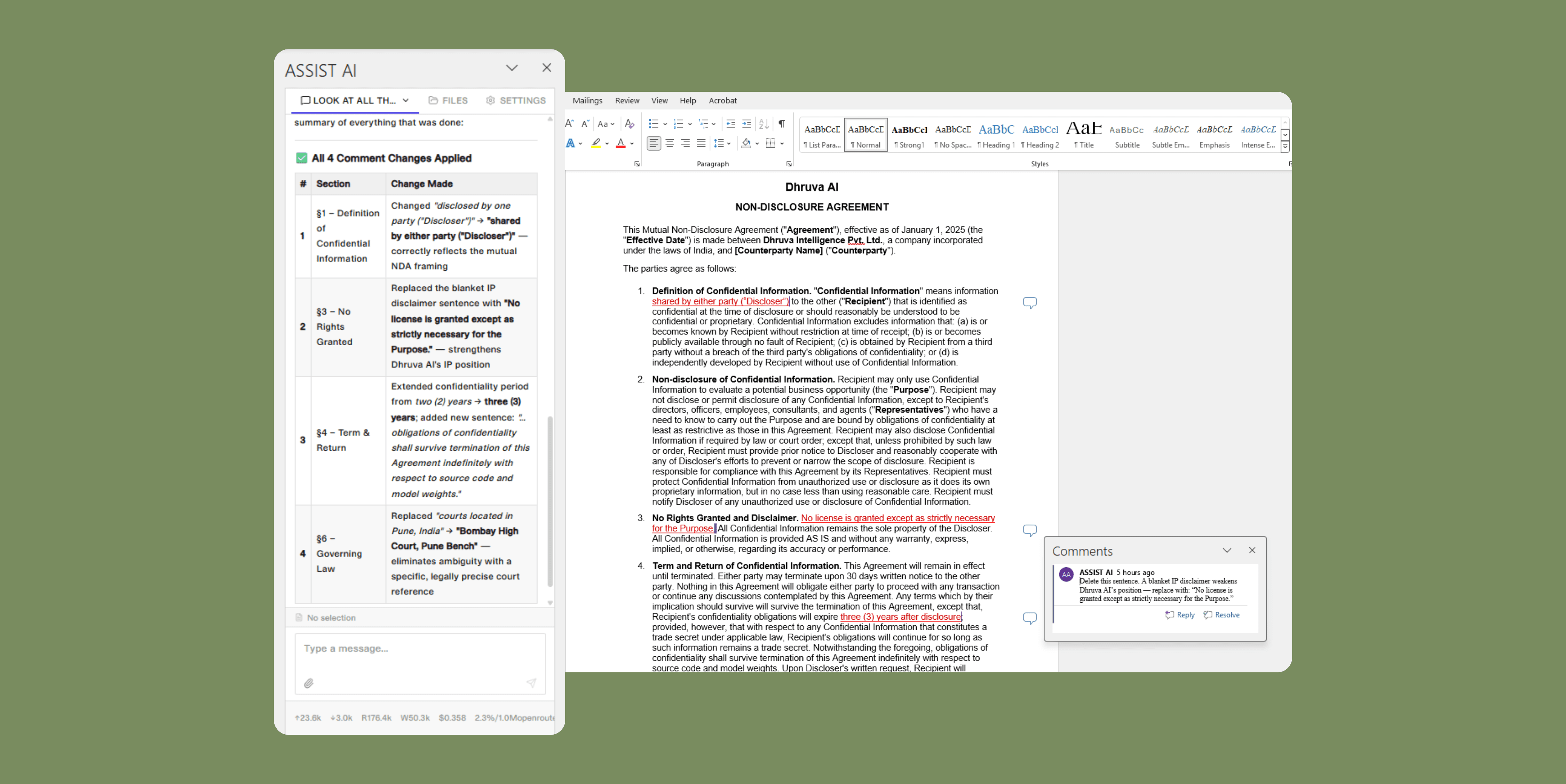
Work through your comments
Drop a comment wherever a change is needed. ASSIST reads the thread, revises the anchored text as a tracked change, and logs its reasoning directly in the reply — so nothing moves without your sign-off.
Draft in your template
Start from your existing template and describe the output you need. ASSIST writes to your heading and bullet styles, pulling cited content from the source documents you upload.
Check for consistency
ASSIST scans the full document for mismatched defined terms, broken cross-references, and numbering gaps — and surfaces fixes as tracked changes ready for your review.
Rewrite what you select
Highlight any paragraph and direct ASSIST to sharpen it, adjust the tone, or strip passive voice. Only the selection changes — styles, structure, and numbering stay intact.
Where Teams Get More Done
Work through your comments
Drop a comment wherever a change is needed. ASSIST reads the thread, revises the anchored text as a tracked change, and logs its reasoning directly in the reply — so nothing moves without your sign-off.
Draft in your template
Start from your existing template and describe the output you need. ASSIST writes to your heading and bullet styles, pulling cited content from the source documents you upload.
Check for consistency
ASSIST scans the full document for mismatched defined terms, broken cross-references, and numbering gaps — and surfaces fixes as tracked changes ready for your review.
Rewrite what you select
Highlight any paragraph and direct ASSIST to sharpen it, adjust the tone, or strip passive voice. Only the selection changes — styles, structure, and numbering stay intact.
Where Teams Get More Done
Work through your comments
Drop a comment wherever a change is needed. ASSIST reads the thread, revises the anchored text as a tracked change, and logs its reasoning directly in the reply — so nothing moves without your sign-off.
Draft in your template
Start from your existing template and describe the output you need. ASSIST writes to your heading and bullet styles, pulling cited content from the source documents you upload.
Check for consistency
ASSIST scans the full document for mismatched defined terms, broken cross-references, and numbering gaps — and surfaces fixes as tracked changes ready for your review.
Rewrite what you select
Highlight any paragraph and direct ASSIST to sharpen it, adjust the tone, or strip passive voice. Only the selection changes — styles, structure, and numbering stay intact.
Where Teams Get More Done
Work through
your comments
Drop a comment wherever a change is needed. ASSIST reads the thread, revises the anchored text as a tracked change, and logs its reasoning directly in the reply — so nothing moves without your sign-off.
Draft in your template
Start from your existing template and describe the output you need. ASSIST writes to your heading and bullet styles, pulling cited content from the source documents you upload.
Check for consistency
ASSIST scans the full document for mismatched defined terms, broken cross-references, and numbering gaps — and surfaces fixes as tracked changes ready for your review.
Rewrite what you select
Highlight any paragraph and direct ASSIST to sharpen it, adjust the tone, or strip passive voice. Only the selection changes — styles, structure, and numbering stay intact.
Where Teams Get More Done
Work through
your comments
Drop a comment wherever a change is needed. ASSIST reads the thread, revises the anchored text as a tracked change, and logs its reasoning directly in the reply — so nothing moves without your sign-off.
Draft in your template
Start from your existing template and describe the output you need. ASSIST writes to your heading and bullet styles, pulling cited content from the source documents you upload.
Check for consistency
ASSIST scans the full document for mismatched defined terms, broken cross-references, and numbering gaps — and surfaces fixes as tracked changes ready for your review.
Rewrite what you select
Highlight any paragraph and direct ASSIST to sharpen it, adjust the tone, or strip passive voice. Only the selection changes — styles, structure, and numbering stay intact.
Your Models ,
Your Choice
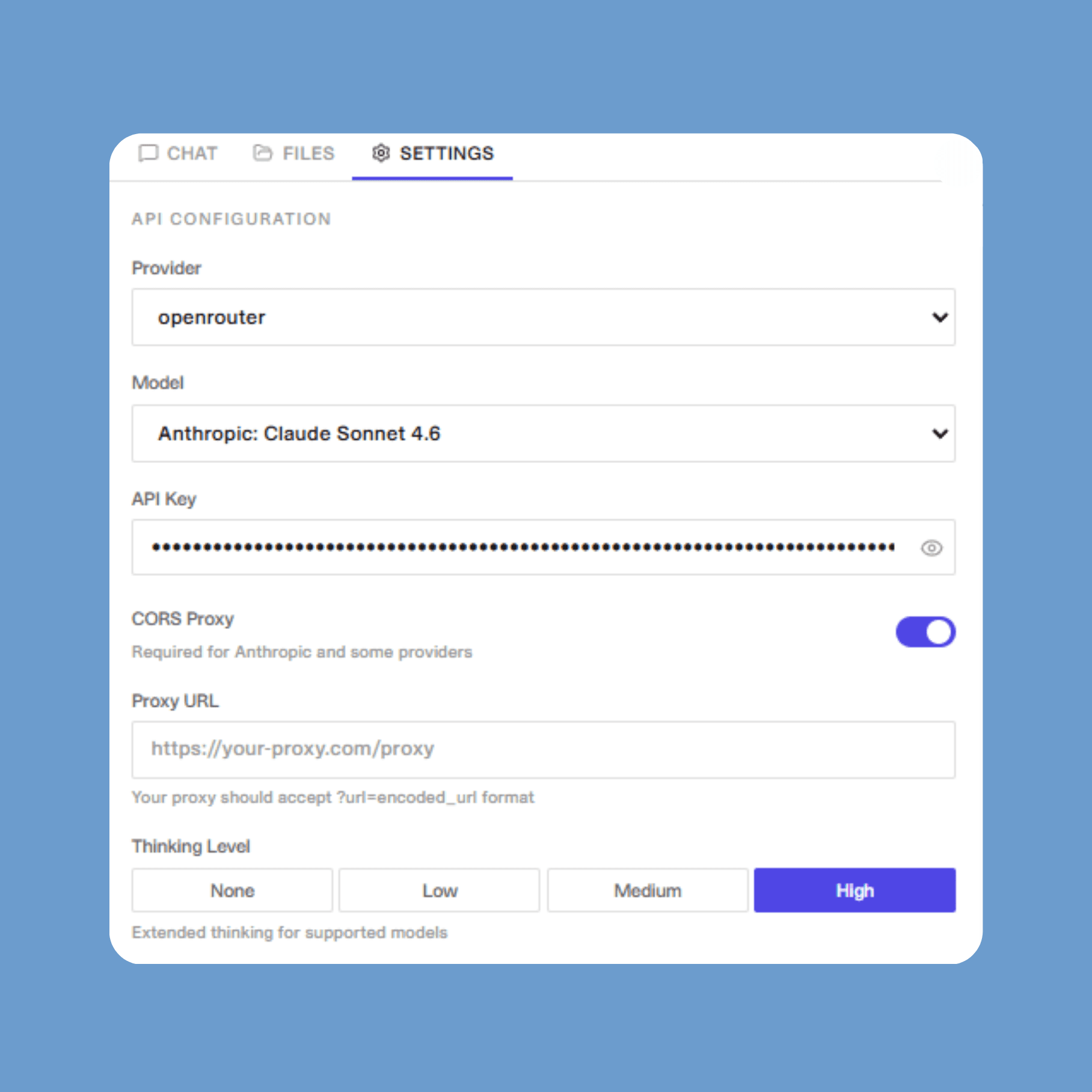
Bring your own API key and connect directly to OpenAI, Anthropic, Google, Azure, OpenRouter, Groq, xAI, Cerebras, Mistral, and more.
Running models locally? ASSIST works with any OpenAI-compatible endpoint — Ollama, vLLM, LM Studio, and beyond.
Built for the entire Office suite
ASSIST has dedicated add-ins for Word, Excel, and PowerPoint — so your team gets the same AI experience across every document, spreadsheet, and presentation.
Your Models ,
Your Choice
Bring your own API key and connect directly to OpenAI, Anthropic, Google, Azure, OpenRouter, Groq, xAI, Cerebras, Mistral, and more.
Running models locally? ASSIST works with any OpenAI-compatible endpoint — Ollama, vLLM, LM Studio, and beyond.
Built for the entire Office suite
ASSIST has dedicated add-ins for Word, Excel, and PowerPoint — so your team gets the same AI experience across every document, spreadsheet, and presentation.
Learn more
Your Models ,
Your Choice
Bring your own API key and connect directly to OpenAI, Anthropic, Google, Azure, OpenRouter, Groq, xAI, Cerebras, Mistral, and more.
Running models locally? ASSIST works with any OpenAI-compatible endpoint — Ollama, vLLM, LM Studio, and beyond.
Built for the entire Office suite
ASSIST has dedicated add-ins for Word, Excel, and PowerPoint — so your team gets the same AI experience across every document, spreadsheet, and presentation.
Your Models ,
Your Choice
Bring your own API key and connect directly to OpenAI, Anthropic, Google, Azure, OpenRouter, Groq, xAI, Cerebras, Mistral, and more.
Running models locally? ASSIST works with any OpenAI-compatible endpoint — Ollama, vLLM, LM Studio, and beyond.
Built for the entire Office suite
ASSIST has dedicated add-ins for Word, Excel, and PowerPoint — so your team gets the same AI experience across every document, spreadsheet, and presentation.
Your Models ,
Your Choice
Bring your own API key and connect directly to OpenAI, Anthropic, Google, Azure, OpenRouter, Groq, xAI, Cerebras, Mistral, and more.
Running models locally? ASSIST works with any OpenAI-compatible endpoint — Ollama, vLLM, LM Studio, and beyond.
Built for the entire Office suite
ASSIST has dedicated add-ins for Word, Excel, and PowerPoint — so your team gets the same AI experience across every document, spreadsheet, and presentation.
The AI your team will actually use
Every edit can be a
tracked change
ASSIST's changes appear as native Word tracked changes. Accept or reject each one in Word's review pane.
Your formatting
stays intact
ASSIST inherits your heading styles, numbering schemes, and defined terms. Edit one section without disturbing the rest.
Enterprise security,
built in
Bring your own API key from any major provider. Your models run through your infrastructure, under your compliance rules.
The AI your team will actually use
Every edit can be a
tracked change
ASSIST's changes appear as native Word tracked changes. Accept or reject each one in Word's review pane.
Your formatting
stays intact
ASSIST inherits your heading styles, numbering schemes, and defined terms. Edit one section without disturbing the rest.
Enterprise security,
built in
Bring your own API key from any major provider. Your models run through your infrastructure, under your compliance rules.
The AI your team will actually use
Every edit can be a
tracked change
ASSIST's changes appear as native Word tracked changes. Accept or reject each one in Word's review pane.
Your formatting
stays intact
ASSIST inherits your heading styles, numbering schemes, and defined terms. Edit one section without disturbing the rest.
Enterprise security,
built in
Bring your own API key from any major provider. Your models run through your infrastructure, under your compliance rules.
The AI your team will actually use
Every edit can be a
tracked change
ASSIST's changes appear as native Word tracked changes. Accept or reject each one in Word's review pane.
Your formatting
stays intact
ASSIST inherits your heading styles, numbering schemes, and defined terms. Edit one section without disturbing the rest.
Enterprise security,
built in
Bring your own API key from any major provider. Your models run through your infrastructure, under your compliance rules.
The AI your team will actually use
Every edit can be a
tracked change
ASSIST's changes appear as native Word tracked changes. Accept or reject each one in Word's review pane.
Your formatting
stays intact
ASSIST inherits your heading styles, numbering schemes, and defined terms. Edit one section without disturbing the rest.
Enterprise security,
built in
Bring your own API key from any major provider. Your models run through your infrastructure, under your compliance rules.
FAQ
Where is this available?
What are the security risks I should know about?
Does Claude preserve my document formatting?
What file formats are supported?
How does Claude handle comments?
FAQ
Where is this available?
What are the security risks I should know about?
Does Claude preserve my document formatting?
What file formats are supported?
How does Claude handle comments?
FAQ
Where is ASSIST available for Microsoft Office?
Which LLMs does ASSIST support?
What are Skills?
Get started with ASSIST for Word
Book an intro
Get started with
ASSIST for Word
Book an intro
Get started with ASSIST for Word
Book an intro
Get started with ASSIST for Word
Book an intro
Get started with
ASSIST for Word
Book an intro
FAQ
Where is ASSIST available for Microsoft Office?
Which LLMs does ASSIST support?
What are Skills?
FAQ
Where is ASSIST available for Microsoft Office?
Which LLMs does ASSIST support?
What are Skills?
FAQ
Where is ASSIST available for Microsoft Office?
Which LLMs does ASSIST support?
What are Skills?
FAQ
Where is ASSIST available for Microsoft Office?
Which LLMs does ASSIST support?
What are Skills?
ASSIST
Overview
AI agents
Industries
Connectors
Security
Stories
Pricing
Company
Legal
Contact US
ASSIST
Overview
AI agents
Industires
Conectors
Security
Stories
Pricing
Company
Legal
Contact Us