Decks done before the next meeting
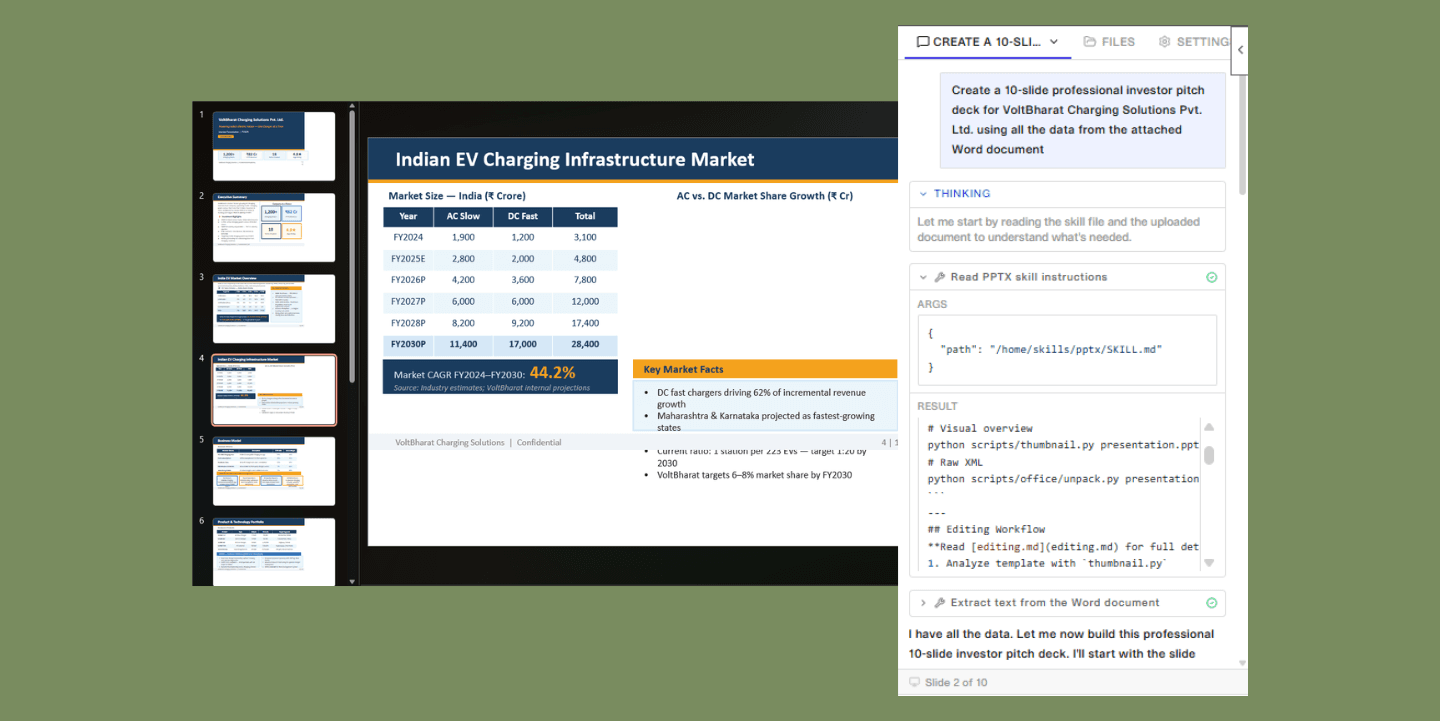
ASSIST lives inside your PowerPoint deck. Build new slides, refine existing ones, and iterate on the fly — all in real time. It picks up your layouts, fonts, and template automatically, so every change looks like it was always meant to be there.
Book an intro
Decks done before the next meeting
ASSIST lives inside your PowerPoint deck. Build new slides, refine existing ones, and iterate on the fly — all in real time. It picks up your layouts, fonts, and template automatically, so every change looks like it was always meant to be there.
Book an intro
Decks done before the next meeting
ASSIST lives inside your PowerPoint deck. Build new slides, refine existing ones, and iterate on the fly — all in real time. It picks up your layouts, fonts, and template automatically, so every change looks like it was always meant to be there.
Book an intro
Decks done before the next meeting
ASSIST lives inside your PowerPoint deck. Build new slides, refine existing ones, and iterate on the fly — all in real time. It picks up your layouts, fonts, and template automatically, so every change looks like it was always meant to be there.
Book an intro
Decks done before the next meeting
ASSIST lives inside your PowerPoint deck. Build new slides, refine existing ones, and iterate on the fly — all in real time. It picks up your layouts, fonts, and template automatically, so every change looks like it was always meant to be there.
Book an intro
Where great presentations get built
Build from a template
Open your client or corporate template and describe what you need. "Create a market sizing section with TAM, SAM, SOM." ASSIST generates slides using the correct layouts, fonts, and colors pulled directly from your master deck.
Iterate on an existing deck
Select a slide and tell ASSIST what to change. Simplify the text, add a chart, restructure the storyline. ASSIST makes edits while keeping your formatting and surrounding context intact.
Generate a full deck from a description
Start with a blank deck and describe your goal. "10 slides walking through an assessment of X industry." ASSIST builds a structured draft. Then refine from there — "Combine slides 5 and 6."
Create native charts and diagrams
Turn bullet points into professional visuals — diagrams, process flows, or editable native PowerPoint charts. ASSIST produces visuals you can edit directly, not static images.
Where great presentations get built
Build from a template
Open your client or corporate template and describe what you need. "Create a market sizing section with TAM, SAM, SOM." ASSIST generates slides using the correct layouts, fonts, and colors pulled directly from your master deck.
Iterate on an existing deck
Select a slide and tell ASSIST what to change. Simplify the text, add a chart, restructure the storyline. ASSIST makes edits while keeping your formatting and surrounding context intact.
Generate a full deck
from a description
Start with a blank deck and describe your goal. "10 slides walking through an assessment of X industry." ASSIST builds a structured draft. Then refine from there — "Combine slides 5 and 6."
Create native charts
and diagrams
Turn bullet points into professional visuals — diagrams, process flows, or editable native PowerPoint charts. ASSIST produces visuals you can edit directly, not static images.
Where great presentations get built
Build from a template
Open your client or corporate template and describe what you need. "Create a market sizing section with TAM, SAM, SOM." ASSIST generates slides using the correct layouts, fonts, and colors pulled directly from your master deck.
Iterate on an existing deck
Select a slide and tell ASSIST what to change. Simplify the text, add a chart, restructure the storyline. ASSIST makes edits while keeping your formatting and surrounding context intact.
Generate a full deck
from a description
Start with a blank deck and describe your goal. "10 slides walking through an assessment of X industry." ASSIST builds a structured draft. Then refine from there — "Combine slides 5 and 6."
Create native charts
and diagrams
Turn bullet points into professional visuals — diagrams, process flows, or editable native PowerPoint charts. ASSIST produces visuals you can edit directly, not static images.
Where great presentations get built
Build from a template
Open your client or corporate template and describe what you need. "Create a market sizing section with TAM, SAM, SOM." ASSIST generates slides using the correct layouts, fonts, and colors pulled directly from your master deck.
Iterate on an existing deck
Select a slide and tell ASSIST what to change. Simplify the text, add a chart, restructure the storyline. ASSIST makes edits while keeping your formatting and surrounding context intact.
Generate a full deck
from a description
Start with a blank deck and describe your goal. "10 slides walking through an assessment of X industry." ASSIST builds a structured draft. Then refine from there — "Combine slides 5 and 6."
Create native charts
and diagrams
Turn bullet points into professional visuals — diagrams, process flows, or editable native PowerPoint charts. ASSIST produces visuals you can edit directly, not static images.
Where great presentations get built
Build from a template
Open your client or corporate template and describe what you need. "Create a market sizing section with TAM, SAM, SOM." ASSIST generates slides using the correct layouts, fonts, and colors pulled directly from your master deck.
Iterate on an existing deck
Select a slide and tell ASSIST what to change. Simplify the text, add a chart, restructure the storyline. ASSIST makes edits while keeping your formatting and surrounding context intact.
Generate a full deck
from a description
Start with a blank deck and describe your goal. "10 slides walking through an assessment of X industry." ASSIST builds a structured draft. Then refine from there — "Combine slides 5 and 6."
Create native charts
and diagrams
Turn bullet points into professional visuals — diagrams, process flows, or editable native PowerPoint charts. ASSIST produces visuals you can edit directly, not static images.
Your Models ,
Your Choice
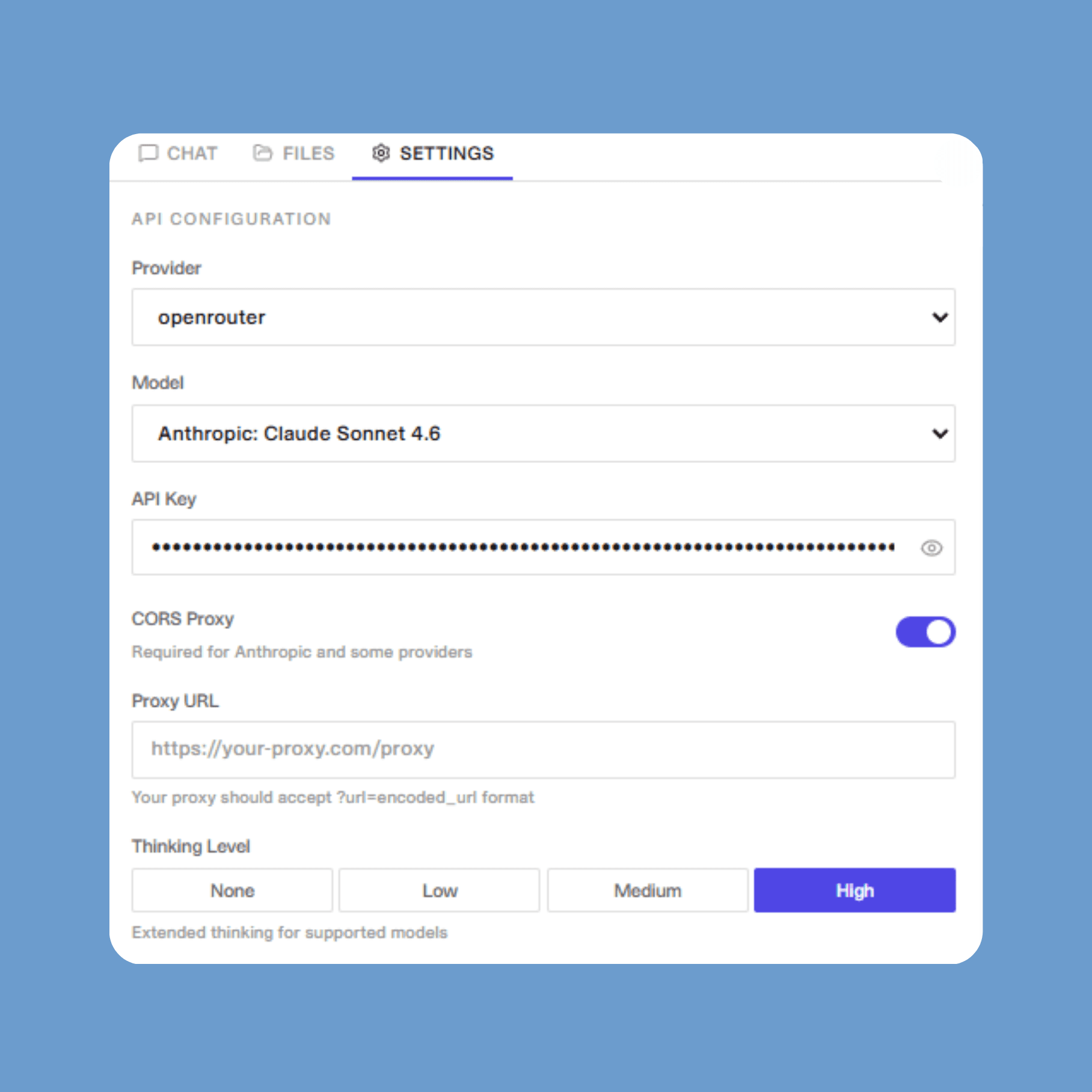
Bring your own API key and connect directly to OpenAI, Anthropic, Google, Azure, OpenRouter, Groq, xAI, Cerebras, Mistral, and more.
Running models locally? ASSIST works with any OpenAI-compatible endpoint — Ollama, vLLM, LM Studio, and beyond.
Built for the entire Office suite
ASSIST has dedicated add-ins for Word, Excel, and PowerPoint — so your team gets the same AI experience across every document, spreadsheet, and presentation.
Book an intro
Your Models ,
Your Choice
Bring your own API key and connect directly to OpenAI, Anthropic, Google, Azure, OpenRouter, Groq, xAI, Cerebras, Mistral, and more.
Running models locally? ASSIST works with any OpenAI-compatible endpoint — Ollama, vLLM, LM Studio, and beyond.
Built for the entire Office suite
ASSIST has dedicated add-ins for Word, Excel, and PowerPoint — so your team gets the same AI experience across every document, spreadsheet, and presentation.
Book an intro
Your Models ,
Your Choice
Bring your own API key and connect directly to OpenAI, Anthropic, Google, Azure, OpenRouter, Groq, xAI, Cerebras, Mistral, and more.
Running models locally? ASSIST works with any OpenAI-compatible endpoint — Ollama, vLLM, LM Studio, and beyond.
Built for the entire Office suite
ASSIST has dedicated add-ins for Word, Excel, and PowerPoint — so your team gets the same AI experience across every document, spreadsheet, and presentation.
Book an intro
Your Models ,
Your Choice
Bring your own API key and connect directly to OpenAI, Anthropic, Google, Azure, OpenRouter, Groq, xAI, Cerebras, Mistral, and more.
Running models locally? ASSIST works with any OpenAI-compatible endpoint — Ollama, vLLM, LM Studio, and beyond.
Built for the entire Office suite
ASSIST has dedicated add-ins for Word, Excel, and PowerPoint — so your team gets the same AI experience across every document, spreadsheet, and presentation.
Book an intro
Your Models ,
Your Choice
Bring your own API key and connect directly to OpenAI, Anthropic, Google, Azure, OpenRouter, Groq, xAI, Cerebras, Mistral, and more.
Running models locally? ASSIST works with any OpenAI-compatible endpoint — Ollama, vLLM, LM Studio, and beyond.
Built for the entire Office suite
ASSIST has dedicated add-ins for Word, Excel, and PowerPoint — so your team gets the same AI experience across every document, spreadsheet, and presentation.
Book an intro
Built for the decks that actually matter
Precise, contextual
editing
ASSIST knows exactly which slide and object you have selected — point it to what needs changing and it handles the rest.
Template integrity
Slide master structure, fonts, and formatting stay exactly as your brand intended.
Enterprise security
ASSIST works within your existing compliance framework — no new security reviews, no IT exceptions required.
Book an intro
Built for the decks that actually matter
Precise, contextual
editing
ASSIST knows exactly which slide and object you have selected — point it to what needs changing and it handles the rest.
Template integrity
Slide master structure, fonts, and formatting stay exactly as your brand intended.
Enterprise security
Works within your existing
compliance framework
Book an intro
Built for the decks that actually matter
Precise, contextual
editing
ASSIST knows exactly which slide and object you have selected — point it to what needs changing and it handles the rest.
Template integrity
Slide master structure, fonts, and formatting stay exactly as your brand intended.
Enterprise security
ASSIST works within your existing compliance framework — no new security reviews, no IT exceptions required.
Book an intro
Built for the decks that actually matter
Precise, contextual
editing
ASSIST knows exactly which slide and object you have selected — point it to what needs changing and it handles the rest.
Template integrity
Slide master structure, fonts, and formatting stay exactly as your brand intended.
Enterprise security
ASSIST works within your existing compliance framework — no new security reviews, no IT exceptions required.
Book an intro
Built for the decks that actually matter
Precise, contextual
editing
ASSIST knows exactly which slide and object you have selected — point it to what needs changing and it handles the rest.
Template integrity
Slide master structure, fonts, and formatting stay exactly as your brand intended.
Enterprise security
ASSIST works within your existing compliance framework — no new security reviews, no IT exceptions required.
Book an intro
FAQ
Where is ASSIST available for Microsoft Office?
Which LLMs does ASSIST support?
What are Skills?
Get started with ASSIST for PowerPoint
Book an intro
Get started with ASSIST for PowerPoint
Book an intro
Get started with ASSIST for PowerPoint
Book an intro
Get started with ASSIST for PowerPoint
Book an intro
Get started with ASSIST for PowerPoint
Book an intro
ASSIST
Overview
AI agents
Industries
Connectors
Security
Stories
Pricing
Company
Legal
Contact US
ASSIST
Overview
AI agents
Industires
Conectors
Security
Stories
Pricing
Company
Legal
Contact Us