Expert help,
straight in Excel
ASSIST operates directly within your Word document rather than opening in a separate window. Highlight your text, explain the changes you need, and view the results as a tracked change.
Book an intro
How teams get more from Excel with ASSIST
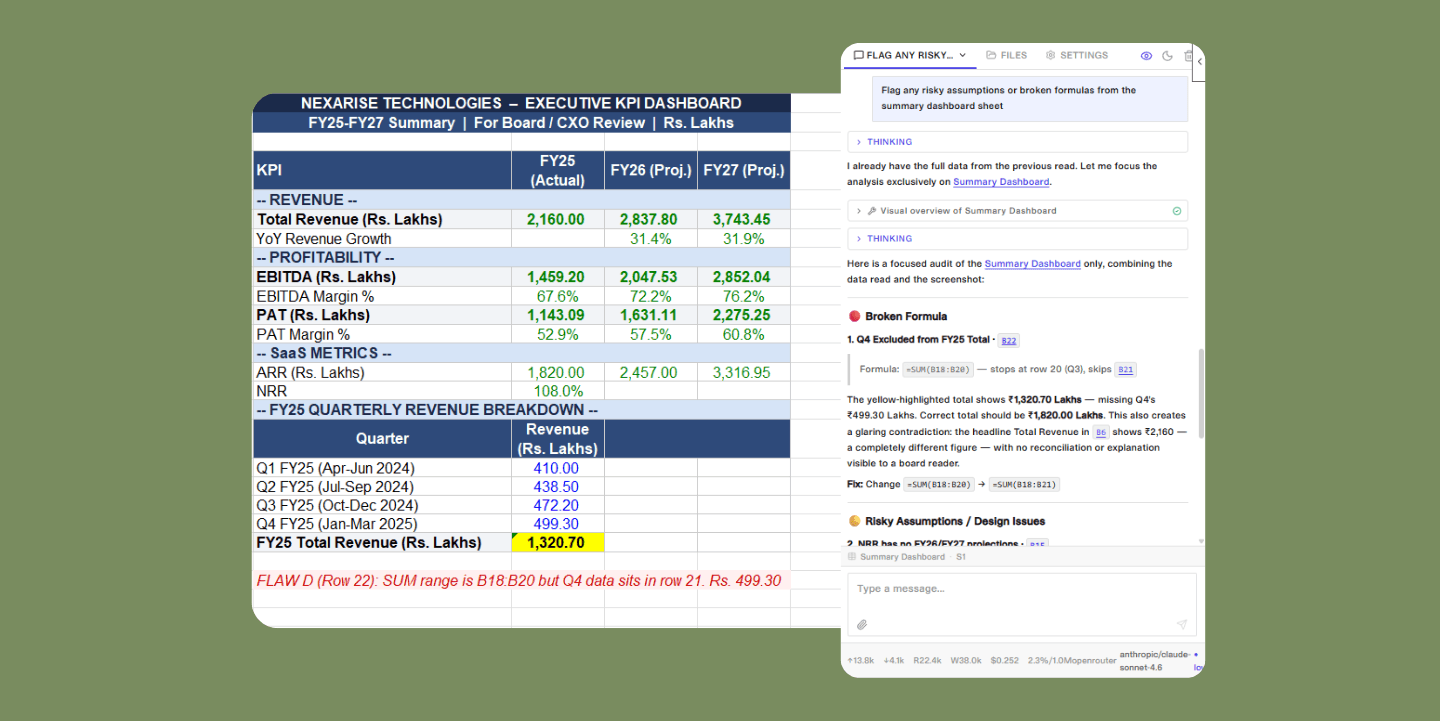
Instant answers for any cell
Cut through complex models in seconds.
Ask ASSIST about specific formulas, entire worksheets,
or calculation flows across tabs. Every explanation comes
with cell-level citations so you can verify the logic yourself.
Scenario testing that keeps
formulas intact
Update assumptions across your entire model without
breaking a single dependency. Test different scenarios
on the fly and ASSIST walks you through every change
with clear explanations for complete transparency.
Find and fix errors fast
Trace #REF!, #VALUE!, and circular reference errors
to their source in seconds. Claude explains what
went wrong and how to fix it without disrupting the
rest of your model.
Build from scratch or work with existing templates
Generate draft financial models based on your
requirements or bring fresh data into existing
templates while keeping all formulas and structure
exactly as they are.
How teams get more from Excel with ASSIST
ASSIST listens carefully, follows instructions precisely, and thinks through complex problems. It adapts to the nuances of your business so every output is relevant, accurate, and ready to act on.
Instant answers for any cell
Cut through complex models in seconds. Ask ASSIST about specific formulas, entire worksheets, or calculation flows across tabs. Every explanation comes with cell-level citations so you can verify the logic yourself.
Scenario testing that keeps formulas intact
Update assumptions across your entire model without breaking a single dependency. Test different scenarios on the fly and ASSIST walks you through every change with clear explanations for complete transparency.
Find and fix errors fast
Trace #REF!, #VALUE!, and circular
reference errors to their source in
seconds. Claude explains what went
wrong and how to fix it without
disrupting the rest of your model.
Build from scratch or work with existing templates
Generate draft financial models based on your requirements or bring fresh data into existing templates while keeping all formulas and structure exactly as they are.
Your Models ,
Your Choice
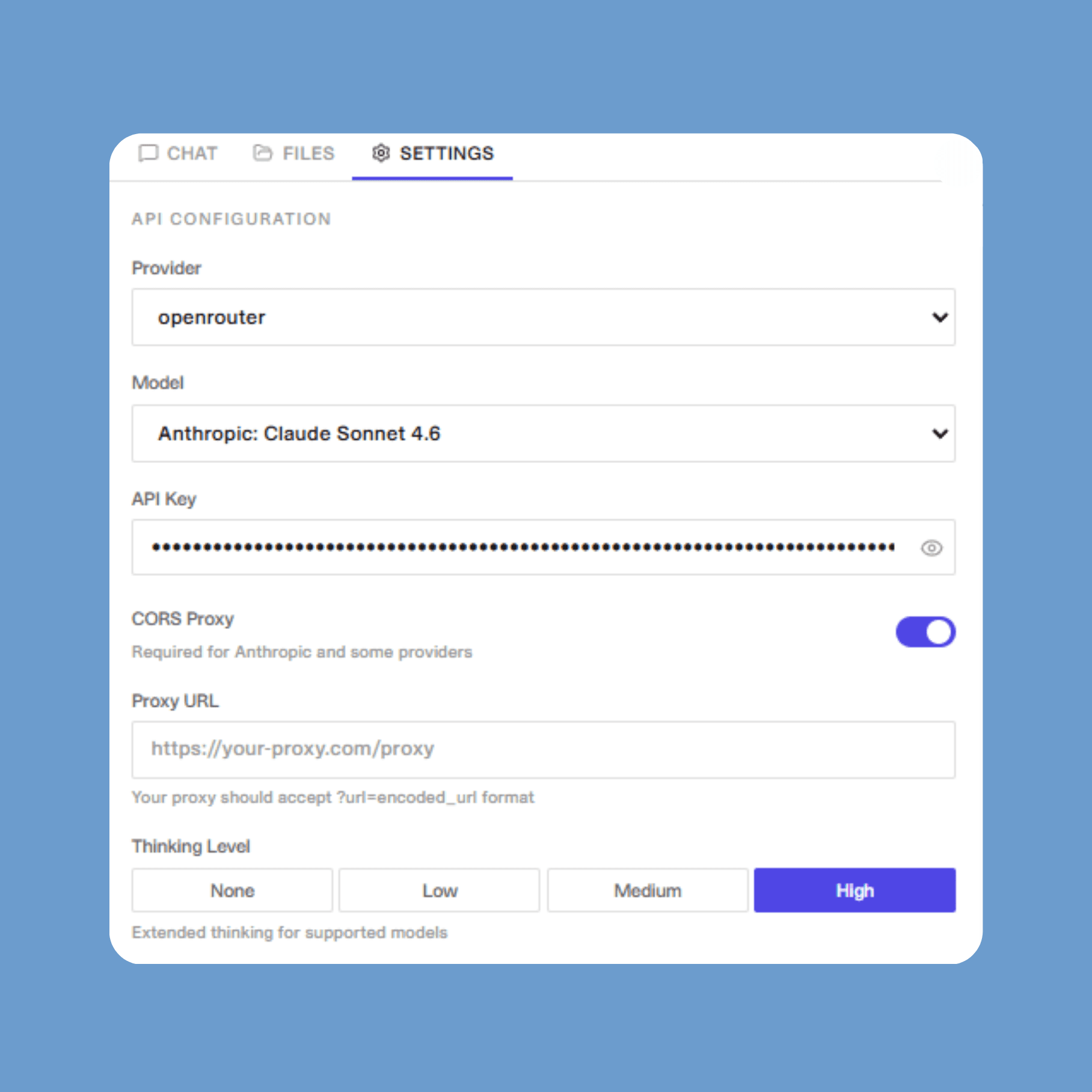
Bring your own API key and connect directly to OpenAI, Anthropic, Google, Azure, OpenRouter, Groq, xAI, Cerebras, Mistral, and more.
Running models locally? ASSIST works with any OpenAI-compatible endpoint — Ollama, vLLM, LM Studio, and beyond.
Built for the entire Office suite
ASSIST has dedicated add-ins for Word, Excel, and PowerPoint — so your team gets the same AI experience across every document, spreadsheet, and presentation.
Your Models ,
Your Choice
Bring your own API key and connect directly to OpenAI, Anthropic, Google, Azure, OpenRouter, Groq, xAI, Cerebras, Mistral, and more.
Running models locally? ASSIST works with any OpenAI-compatible endpoint — Ollama, vLLM, LM Studio, and beyond.
Built for the entire Office suite
ASSIST has dedicated add-ins for Word, Excel, and PowerPoint — so your team gets the same AI experience across every document, spreadsheet, and presentation.
Learn more
Your Models ,
Your Choice
Bring your own API key and connect directly to OpenAI, Anthropic, Google, Azure, OpenRouter, Groq, xAI, Cerebras, Mistral, and more.
Running models locally? ASSIST works with any OpenAI-compatible endpoint — Ollama, vLLM, LM Studio, and beyond.
Built for the entire Office suite
ASSIST has dedicated add-ins for Word, Excel, and PowerPoint — so your team gets the same AI experience across every document, spreadsheet, and presentation.
Your Models ,
Your Choice
Bring your own API key and connect directly to OpenAI, Anthropic, Google, Azure, OpenRouter, Groq, xAI, Cerebras, Mistral, and more.
Running models locally? ASSIST works with any OpenAI-compatible endpoint — Ollama, vLLM, LM Studio, and beyond.
Built for the entire Office suite
ASSIST has dedicated add-ins for Word, Excel, and PowerPoint — so your team gets the same AI experience across every document, spreadsheet, and presentation.
Expert help,
straight in Excel
ASSIST operates directly within your Word document rather than opening in a separate window. Highlight your text, explain the changes you need, and view the results as a tracked change.
Book an intro
Your smartest Excel collaborator,
already at work
Transparency and visibility
See ASSIST's changes in real time with clear explanations.
Formula integrity
Maintain your Excel model's structure and
formatting throughout.
Enterprise security
Works seamlessly within your existing compliance framework.
Deployment flexibility
Access through an ASSIST account or
your existing cloud provider
Your smartest Excel collaborator, already at work
Transparency and visibility
See ASSIST's changes in real time with clear explanations.
Formula integrity
Maintain your Excel model's structure and formatting throughout.
Enterprise security
Works seamlessly within your existing compliance framework.
Deployment flexibility
Access through an ASSIST account or your existing cloud provider
Your Models ,
Your Choice
Bring your own API key and connect directly to OpenAI, Anthropic, Google, Azure, OpenRouter, Groq, xAI, Cerebras, Mistral, and more.
Running models locally? ASSIST works with any OpenAI-compatible endpoint — Ollama, vLLM, LM Studio, and beyond.
Built for the entire Office suite
ASSIST has dedicated add-ins for Word, Excel, and PowerPoint — so your team gets the same AI experience across every document, spreadsheet, and presentation.
Your smartest Excel collaborator,
already at work
Transparency and visibility
See ASSIST's changes in real time with clear explanations.
Formula integrity
Maintain your Excel model's structure and
formatting throughout.
Enterprise security
Works seamlessly within your existing compliance framework.
Deployment flexibility
Access through an ASSIST account or
your existing cloud provider
Your smartest Excel collaborator, already at work
Transparency and visibility
See ASSIST's changes in real time with clear explanations.
Formula integrity
Maintain your Excel model's structure and formatting throughout.
Enterprise security
Works seamlessly within your existing compliance framework.
Deployment flexibility
Access through an ASSIST account or your existing cloud provider
Your smartest Excel collaborator, already at work
Transparency and visibility
See ASSIST's changes in real time with clear explanations.
Formula integrity
Maintain your Excel model's structure and formatting throughout.
Enterprise security
Works seamlessly within your existing compliance framework.
Deployment flexibility
Access through an ASSIST account or your existing cloud provider
How teams get more from Excel with ASSIST
Instant answers for any cell
Cut through complex models in seconds.
Ask ASSIST about specific formulas, entire worksheets,
or calculation flows across tabs. Every explanation comes
with cell-level citations so you can verify the logic yourself.
Scenario testing that keeps
formulas intact
Update assumptions across your entire model without
breaking a single dependency. Test different scenarios
on the fly and ASSIST walks you through every change
with clear explanations for complete transparency.
Find and fix errors fast
Trace #REF!, #VALUE!, and circular reference errors
to their source in seconds. Claude explains what
went wrong and how to fix it without disrupting the
rest of your model.
Build from scratch or work with existing templates
Generate draft financial models based on your
requirements or bring fresh data into existing
templates while keeping all formulas and structure
exactly as they are.
Instant answers for any cell
Cut through complex models in seconds. Ask ASSIST about specific formulas, entire worksheets, or calculation flows across tabs. Every explanation comes with cell-level citations so you can verify the logic yourself.
Scenario testing that keeps formulas intact
Update assumptions across your entire model without breaking a single dependency. Test different scenarios on the fly and ASSIST walks you through every change with clear explanations for complete transparency.
Find and fix errors fast
Trace #REF!, #VALUE!, and circular
reference errors to their source in
seconds. Claude explains what
went wrong and how to fix it
without disrupting the rest of
your model.
Build from scratch or work with existing templates
Generate draft financial models based on your requirements or bring fresh data into existing templates while keeping all formulas and structure exactly as they are.
How teams get more from Excel with ASSIST
ASSIST listens carefully, follows instructions precisely,
and thinks through complex problems. It adapts to the nuances of your business so
every output is relevant, accurate, and ready to act on.
Expert help,
straight in Excel
Ask ASSIST about any cell, formula, or tab. Tweak your assumptions without breaking a thing.
Book an intro
Expert help,
straight in Excel
Ask ASSIST about any cell, formula, or tab. Tweak your assumptions without breaking a thing.
Book an intro
Expert help,
straight in Excel
Ask ASSIST about any cell, formula, or tab. Tweak your assumptions without breaking a thing.
Book an intro
How teams get more from Excel with ASSIST
ASSIST listens carefully, follows instructions precisely, and thinks through complex problems. It adapts to the nuances of your business so every output is relevant, accurate, and ready to act on.
Instant answers for any cell
Cut through complex models in seconds. Ask ASSIST about specific formulas, entire worksheets, or calculation flows across tabs. Every explanation comes with cell-level citations so you can verify the logic yourself.
Scenario testing that keeps formulas intact
Update assumptions across your entire model without breaking a single dependency. Test different scenarios on the fly and ASSIST walks you through every change with clear explanations for complete transparency.
Find and fix errors fast
Trace #REF!, #VALUE!, and circular
reference errors to their source in
seconds. Claude explains what went
wrong and how to fix it without
disrupting the rest of your model.
Build from scratch or work with existing templates
Generate draft financial models based on your requirements or bring fresh data into existing templates while keeping all formulas and structure exactly as they are.
How teams get more from Excel with ASSIST
Instant answers for any cell
Cut through complex models in seconds.
Ask ASSIST about specific formulas, entire worksheets,
or calculation flows across tabs. Every explanation comes
with cell-level citations so you can verify the logic yourself.
Scenario testing that keeps
formulas intact
Update assumptions across your entire model without
breaking a single dependency. Test different scenarios
on the fly and ASSIST walks you through every change
with clear explanations for complete transparency.
Find and fix errors fast
Trace #REF!, #VALUE!, and circular reference errors
to their source in seconds. Claude explains what
went wrong and how to fix it without disrupting the
rest of your model.
Build from scratch or work with existing templates
Generate draft financial models based on your
requirements or bring fresh data into existing
templates while keeping all formulas and structure
exactly as they are.
How teams get more from Excel with ASSIST
ASSIST listens carefully, follows instructions precisely, and thinks through complex problems. It adapts to the nuances of your business so every output is relevant, accurate, and ready to act on.
Instant answers for any cell
Cut through complex models in seconds. Ask ASSIST about specific formulas, entire worksheets, or calculation flows across tabs. Every explanation comes with cell-level citations so you can verify the logic yourself.
Scenario testing that keeps formulas intact
Update assumptions across your entire model without breaking a single dependency. Test different scenarios on the fly and ASSIST walks you through every change with clear explanations for complete transparency.
Find and fix errors fast
Trace #REF!, #VALUE!, and circular
reference errors to their source in
seconds. Claude explains what
went wrong and how to fix it
without disrupting the rest of
your model.
Build from scratch or work with existing templates
Generate draft financial models based on your requirements or bring fresh data into existing templates while keeping all formulas and structure exactly as they are.
Your Models ,
Your Choice
Bring your own API key and connect directly to OpenAI, Anthropic, Google, Azure, OpenRouter, Groq, xAI, Cerebras, Mistral, and more.
Running models locally? ASSIST works with any OpenAI-compatible endpoint — Ollama, vLLM, LM Studio, and beyond.
Built for the entire Office suite
ASSIST has dedicated add-ins for Word, Excel, and PowerPoint — so your team gets the same AI experience across every document, spreadsheet, and presentation.
Your smartest Excel collaborator,
already at work
Transparency and visibility
See ASSIST's changes in real time with clear explanations.
Formula integrity
Maintain your Excel model's structure and
formatting throughout.
Enterprise security
Works seamlessly within your existing compliance framework.
Deployment flexibility
Access through an ASSIST account or
your existing cloud provider
FAQ
Where is ASSIST available for Microsoft Office?
Which LLMs does ASSIST support?
What are Skills?
Get started with ASSIST for Excel
Book an intro
Get started with ASSIST for Excel
Book an intro
Get Started with
ASSIST for Excel
Book an intro
Get started with ASSIST for Excel
Book an intro
Get started with
ASSIST for Excel
Book an intro
Your smartest Excel collaborator, already at work
Transparency and visibility
See ASSIST's changes in real time with clear explanations.
Formula integrity
Maintain your Excel model's structure and formatting throughout.
Enterprise security
Works seamlessly within your existing compliance framework.
Deployment flexibility
Access through an ASSIST account or your existing cloud provider
FAQ
Where is ASSIST available for Microsoft Office?
Which LLMs does ASSIST support?
What are Skills?
FAQ
Where is ASSIST available for Microsoft Office?
Which LLMs does ASSIST support?
What are Skills?
FAQ
Where is ASSIST available for Microsoft Office?
Which LLMs does ASSIST support?
What are Skills?
ASSIST
Overview
AI agents
Industries
Connectors
Security
Stories
Pricing
Company
Legal
Contact US
ASSIST
Overview
AI agents
Industires
Conectors
Security
Stories
Pricing
Company
Legal
Contact Us